Maximize Business Sales 8 Facebook Ad Steps for Quality Leads
To get high-quality leads that actually buy, you must target the right audience. Do not waste money on broad groups. Instead, target people based on their exact interests and needs. Use Facebook’s “Leads” goal and quick mobile forms so users can sign up easily. Adding a few custom questions to your form will quickly filter out time-wasting browsers.
To make people stop scrolling, pair a great offer with a clean visual. Give away something valuable for free, like a helpful checklist or a discount code. Your ad image or video must catch their eye in under three seconds. Write short, simple text that focuses on fixing the customer’s main problem, and use a clear action button.
Getting the lead is just the start; you must follow up fast to close the sale. Connect your ads to your email system so new leads get an instant message. Test different headlines and pictures every week to see what works best. This keeps your costs low and helps you put your money into the ads that make the most profit.
Step 1:lock in your ideal ad campaign goal
Picking the wrong goal in Meta Ads Manager can ruin your results before you start. The algorithm needs clear direction to find the right people for your business.
To get the best results, you must choose a goal that matches how you want to collect client information. You can use simple built-in forms, your own website, or fully automated AI settings.
The wrong goal wastes your ad budget on useless clicks. By picking the right setup, you train the Meta algorithm to find real buyers. This simple step protects your money and builds a high-paying lead generation machine.
Step 2: Configure Your Campaign Inside Meta Ads Manager
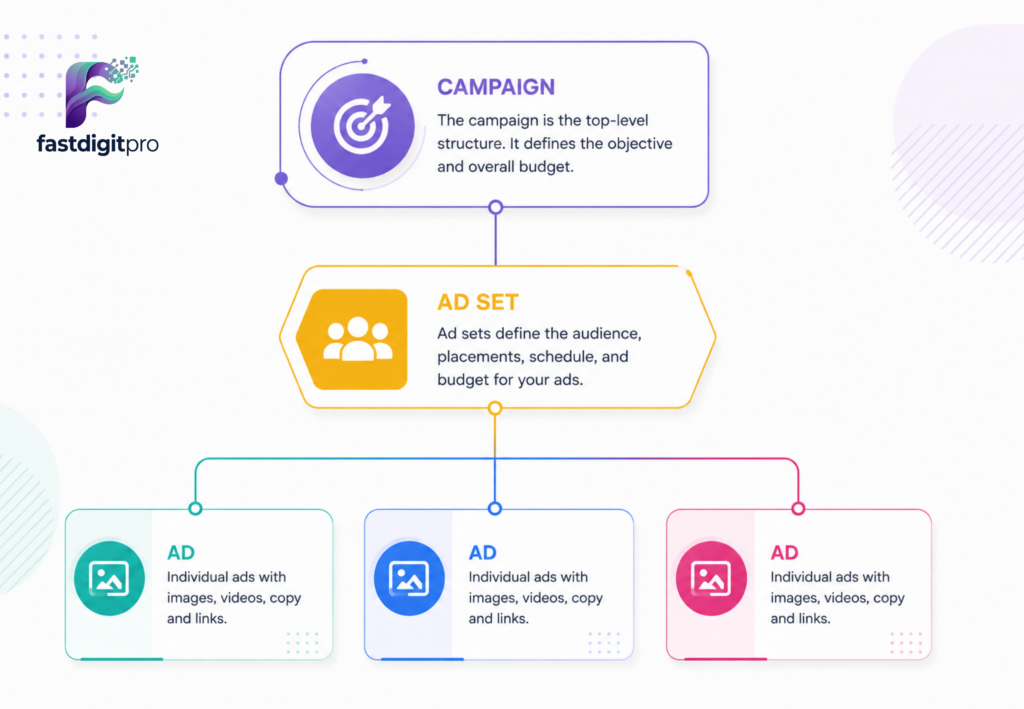
Setting up your system correctly inside Meta Ads Manager is the essential foundation for launching a profitable marketing drive. Once your core objective is locked in, you must carefully navigate the primary campaign settings to protect your money. Rushing through this initial structural preparation phase often leads to restricted ad delivery or rapidly drained budgets.
By activating Advantage Campaign Budget (CBO), you allow Meta’s smart system to automatically shift your cash toward the best ad sets in real time. This automated optimization keeps your overall cost per lead as low as possible.
The final phase involves choosing your optimization goals and selecting smart ad placements across the digital network. Utilizing Advantage+ placements allows your messaging to adapt across Facebook and Instagram based on where users are most active. This strategic distribution ensures your brand stays ahead while building a scalable customer acquisition system.
Step 3: Master Your Audience Targeting
Choosing the wrong audience will waste your ad budget quickly. Even the best ad fails if it reaches the wrong people. Meta provides three main targeting options to help you find the right buyers.
- Custom Audiences: These are people who already know your brand well. This group includes past buyers, website visitors, and active page followers. It is always your highest-converting audience group.
- Lookalike Audiences: Meta finds new people who match your best customers. The system studies your buyers’ habits to find similar users. This is the fastest way to scale your business.
- Interest and Demographic Targeting: This option connects you with cold audiences who do not know you yet. You can filter people by their age, location, and daily hobbies. It requires strong testing since these users have no relationship with you.
The biggest mistake to avoid is mixing too many different groups into one single campaign. This causes your own ads to compete against each other for views. Keep your target groups separate to get the best results.
Step 4: Pick the Right Lead Generation Method
Choosing how you collect user data changes your conversion rates. Meta offers three distinct ways to capture fresh leads for your business. Each method balances speed and data quality differently.
- Instant Forms: Users share their contact details directly inside the Meta platform. This method offers low friction because the form fills out automatically. It creates a seamless user experience that brings in higher conversion volumes.
- Website Forms: This option sends targeted traffic away from social media to your landing page. It introduces medium friction since users must wait for your site to load. You get higher quality data but fewer total form completions.
- Click-to-Message Ads: This style starts a direct chat conversation before asking for personal details. It creates high friction because it requires real-time engagement and active messaging. It yields the lowest conversion volume but builds deep trust with buyers.
Step 5: Setup and Optimize Meta Tracking Infrastructure
Skipping your tracking setup is the biggest mistake you can make. Your data infrastructure dictates how well your campaigns will scale. You need proper tracking to show Meta exactly who is buying your products.
- Meta Pixel Implementation: This is a small code snippet placed on your website. It tracks visitor actions like page views and button clicks. It helps Meta optimize your ads for the best possible results.
- Conversions API (CAPI): This tool sends customer data directly from your web server to Meta. It acts as a secure backup for your browser tracking. It bypasses data loss caused by ad blockers and browser privacy rules.
- Conversion Event Mapping: You must link your website lead forms to specific tracking events. This process tells Meta exactly when a user completes a signup. It improves your ad targeting accuracy automatically over time.
Step 6: Create Ads That Build Instant Consumer Trust
High-converting ads always focus on simplicity. You have less than two seconds to grab a user’s attention while they scroll. Cluttered designs will confuse buyers and destroy your conversion rates.
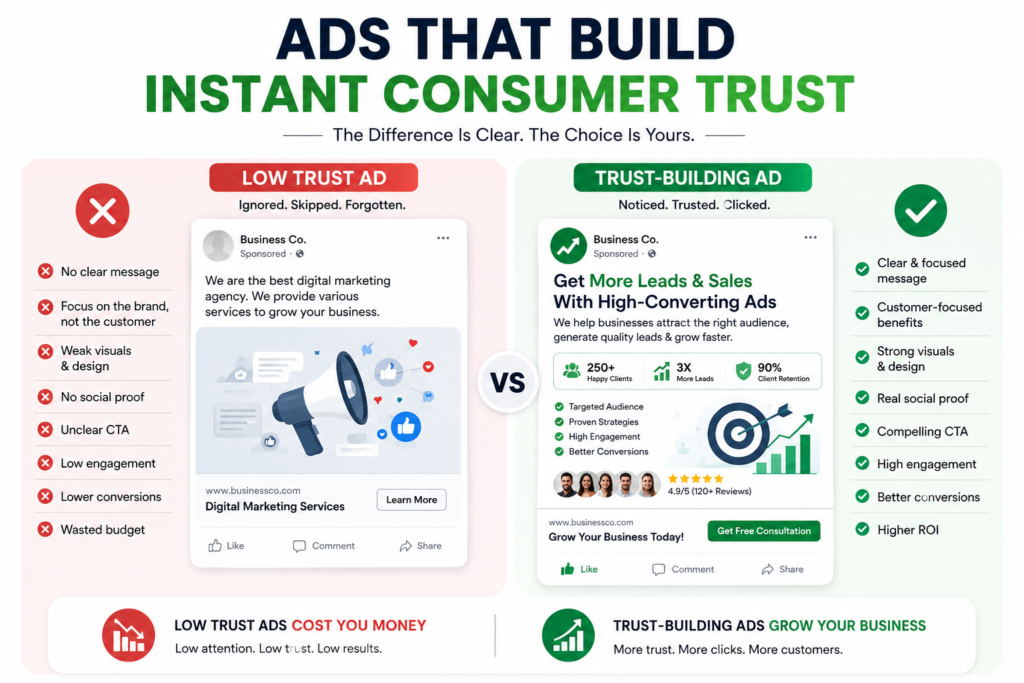
- Focused Messaging: Keep your ad copy clear and straight to the point. State your main offer immediately without using complicated business words. A simple message helps users understand your service instantly.
- Visual Hierarchy: Put your most important information in large, bold fonts. Use clean backgrounds with plenty of empty white space. Good visual structure guides the user’s eyes directly to your offer.
- Single Action Focus: Never give your audience too many choices or links to click. Stick to one clear button like a free consultation offer. Reducing user choices always increases your total leads.
The core strategy to remember is that simple designs always outperform busy ones. Clean visuals lead to higher engagement and cheaper customer acquisition costs.
Step 7: Build Smarter Lead Forms to Filter High-Value Buyers
Short forms bring in too many junk leads. Long forms scare away good customers. The real secret is finding a healthy balance between form length and lead value.
- Qualifying Questions: Add specific questions about budget or business size. This filters out casual browsers instantly. It ensures your sales team only talks to real buyers.
- Conditional Logic: Use smart forms that change based on user answers. If a user selects a small budget, the form adapts. This keeps the experience relevant for every single person.
- Intentional Friction: Adding a few extra steps helps drop bad submissions. It slows down users just enough to test their genuine interest. This saves you time and sales resources later.
The main takeaway here is that quality always beats quantity. Fewer leads with high intent will make you more money than thousands of fake signups.
Step 8: Track Real Profit Metrics to Scale Your Campaigns
Likes and shares do not pay your business bills. Only revenue tracks real marketing success. You must look past superficial data to scale your campaigns safely.
- Cost Per Lead (CPL): This shows the exact price of acquiring one contact. It helps you monitor your daily ad spending efficiency. Keep this number low without losing lead quality.
- Lead-to-Customer Rate: This tracks the percentage of signups that actually buy. It measures the true sales impact of your ads. It proves whether your traffic is valuable.
- Return on Ad Spend (ROAS): This calculates the direct revenue earned from every dollar spent. It is your most important metric for long-term growth. Use it to decide which campaigns deserve more budget.
The golden rule for scaling is to ignore vanity metrics completely. Focus all your optimization efforts on cash flow and conversion rates.
Tracking the right numbers is the only way to scale your digital business without losing money. Many business owners make the mistake of celebrating high click rates and cheap video views, but these vanity numbers do not pay for your inventory or employee salaries. To grow safely, you must focus entirely on profit metrics like Cost Per Lead (CPL) and Return on Ad Spend (ROAS). These figures tell you the exact financial health of your marketing campaigns by showing how much cash flows back into your bank account for every single dollar you give to Meta. Once you identify the specific ads that bring in paying customers rather than just casual browsers, you can confidently increase your daily budget to maximize your revenue.
You must stop focusing on social media likes and start tracking real business profit. True marketing growth happens when you optimize your campaigns around Return on Ad Spend (ROAS) and Lead-to-Customer Rates. Knowing these essential numbers helps you cut down on losing ads and spend your budget only on campaigns that bring in cold, hard cash.
Ready to Turn Clicks into Cash Flow?
Stop wasting time chasing empty social media engagement.
You need a predictable pipeline that converts casual website visitors into high-paying buyers day after day.
Frequently Asked Questions
What is the fastest way to get high-quality leads on Facebook?
The absolute fastest way is using Lookalike Audiences combined with Smart Lead Forms. Lookalike audiences allow Meta to find new users who share exact habits with your past buyers. Adding a few qualifying questions to your forms filters out casual browsers so you only collect high-value leads.
Why am I getting lots of clicks but no actual sales?
You are likely focusing too much on Vanity Metrics like clicks instead of Profit Metrics. This usually happens when your ad copy is confusing or your target audience is too broad. To fix this, make your ad message simple and use Conversions API (CAPI) to track true buyer actions.
Should I use Meta Instant Forms or my own Website Forms?
It depends entirely on whether you want high volume or high quality. Instant Forms offer low friction and bring in a high volume of fast leads directly inside the app. Website Forms require more effort from the user, which results in fewer leads but much higher buyer intent.
How does the Meta Pixel help in maximizing business sales?
The Meta Pixel tracks exactly what people do after clicking your ads. It monitors page views, button clicks, and form submissions on your website. This data teaches the Meta system who your best customers are so it can optimize your future campaigns automatically.
How many fields should a high-converting Facebook lead form have?
A great lead form should have 3 to 5 fields maximum. Asking for basic contact info along with one or two qualifying questions keeps the process smooth. If you make the form too long, good customers will get tired and leave before submitting their data.